반응형 웹에서는 하나 이상의 Signal들을 동시에 고려해야 하는 중첩된 반응성을 다뤄야 하는 경우가 있습니다.
예를 들어 작업 목록에서 각 작업의 완료 여부를 확인하고자 할 때,
1) 작업 목록 Signal
2) 작업 완료 여부 Signal
이 두 가지 반응성을 함께 고려해야 합니다.
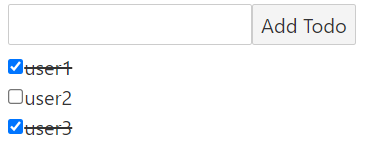
아래는 두 가지 Signal(todos, completed)를 사용해서 이 상황을 구현한 코드입니다.
toggleTodo( )는 각 작업 항목에서 호출되는 함수이므로,
크게 todos라는 리스트 signal이 있고 다수의 completed signal들이 있다고 볼 수 있겠습니다.
이 두 가지 signal들을 이용해서 toggleTodo( ) 함수는 작업 항목의 완료 여부를 체크합니다.
  // Signal 1 : 작업 목록
  const [todos, setTodos] = createSignal([])
  let input;
  let todoId = 0;

  // todo 리스트에 새로운 작업을 추가합니다.
  const addTodo = (text) => {
    // Signal 2 : 작업 완료 여부
    const [completed, setCompleted] = createSignal(false);
    setTodos([...todos(), { id: ++todoId, text, completed, setCompleted }]);
  }

  // 작업 항목의 완료 여부를 체크(혹은 체크 해제)합니다.
  const toggleTodo = (id) => {
    const todo = todos().find((t) => t.id === id);  // 1. todo signal에서 원하는 item을 찾고
    if (todo) todo.setCompleted(!todo.completed())  // 2. 찾은 item의 completed signal을 수정합니다.
  }
Store를 사용하면 toggleTodo( )의 작업을 좀 더 간편하게 작성할 수 있습니다.
Signal과 달리 Store는 getter를 호출할 때 함수(todos())형으로 호출하지 않고 바로 호출(todos)하는 것을 알 수 있습니다.
  import { createStore } from "solid-js/store";

  let input;
  let todoId = 0;
  const [todos, setTodos] = createStore([]);

  // todo 리스트에 새로운 작업을 추가합니다.
  const addTodo = (text) => {
    setTodos([...todos, { id: ++todoId, text, completed: false }]);
  }

  // 작업 항목의 완료 여부를 체크(혹은 체크 해제)합니다.
  const toggleTodo = (id) => {
    // 위의 두 가지 과정을 코드 한 줄로 표현할 수 있습니다.
    setTodos(todo => todo.id === id, "completed", completed => !completed);
  }
또한 toggleTodo의 코드를 보면 알 수 있듯이, setter함수를 다른 방식으로 사용할 수도 있습니다.
Store에 할당된 값이 여러 계층으로 이루어져 있는 구조일 때, 전체가 아닌 하위 값 중 하나만 수정해야할 때가 있습니다.
그 때 (getter, 하위 값, 수정할 내용)의 형식으로 접근할 수 있습니다.
[todos, setTodos] = createStore({a: 1, b: 'c', c: true});
setTodos(todos, c, false);
본문 코드를 예시로 들어보겠습니다.
| 구문 | 동작 | 세부내용 |
| todo => todo.id === id | getter (일부 요소만) | todos의 각 요소 중에서 id값과 input id값이 같은 요소들에 대해 |
| "completed" | 수정할 하위 값 | completed를 수정 |
| completed => !completed | 변경할 내용 | completed의 boolean 값을 반전 |
정리하면, todos의 요소들 중에서 입력한 id값을 지닌 요소의 completed 값을 반전한다라고 볼 수 있습니다.
아래는 코드 전문입니다.
import { render } from "solid-js/web";
import { For } from "solid-js";
import { createStore } from "solid-js/store";

const App = () => {
  let input;
  let todoId = 0;
  const [todos, setTodos] = createStore([]);

  const addTodo = (text) => {
    setTodos([...todos, { id: ++todoId, text, completed: false }]);
  }

  const toggleTodo = (id) => {
    setTodos(todo => todo.id === id, "completed", completed => !completed);
  }

  return (
    <>
      <div>
        <input ref={input} />
        <button
          onClick={(e) => {
            if (!input.value.trim()) return;
            addTodo(input.value);
            input.value = "";
          }}
        >
          Add Todo
        </button>
      </div>
      <For each={todos}>
        {(todo) => {
          const { id, text } = todo;
          console.log(`Creating ${text}`)
          return <div>
            <input
              type="checkbox"
              checked={todo.completed}
              onchange={[toggleTodo, id]}
            />
            <span
              style={{ "text-decoration": todo.completed ? "line-through" : "none" }}
            >{text}</span>
          </div>
        }}
      </For>
    </>
  );
};

render(App, document.getElementById("app"));'Frontend > SolidJS' 카테고리의 다른 글
| [Solid] Syntax | 10. Produce와 불변성 (0) | 2024.06.26 |
|---|---|
| [Solid] SolidJS 프로젝트 시작하기 (0) | 2024.06.25 |
| [Solid] Syntax | 08. props (0) | 2024.06.21 |
| [Solid] Syntax | 07. ref (0) | 2024.06.21 |
| [Solid] Syntax | 06. classList (0) | 2024.06.21 |